Chronomix
Data Cable Chronomix
Data Cable
Chronomix
Data Cable Chronomix
Data CableThe Data Cable is used to connect the CC737 computer port to an RS-232 serial port on a computer. This cable has a metal stereo phono plug on one end (for the CC737) and either a 9 or 25 pin 'D' connector on the other. You may purchase this cable from Chronomix Corporation (item # 111-0090 $36) or build your own (instructions are provided below).
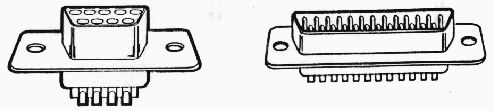
The serial port on modern computers uses one of two connectors: a male 9 pin 'D' connector or a 25 pin male 'D' connector. Most modern computers use a 9 pin male 'D' connector for their first serial port (COM1) and a 25 pin male 'D' connector for their second serial port (COM2), though their are always exceptions. You will need to check the computer you wish to connect to the CC737 for the type of connector it has for the serial port before ordering a data cable. Illustrations of the connectors are provided below.
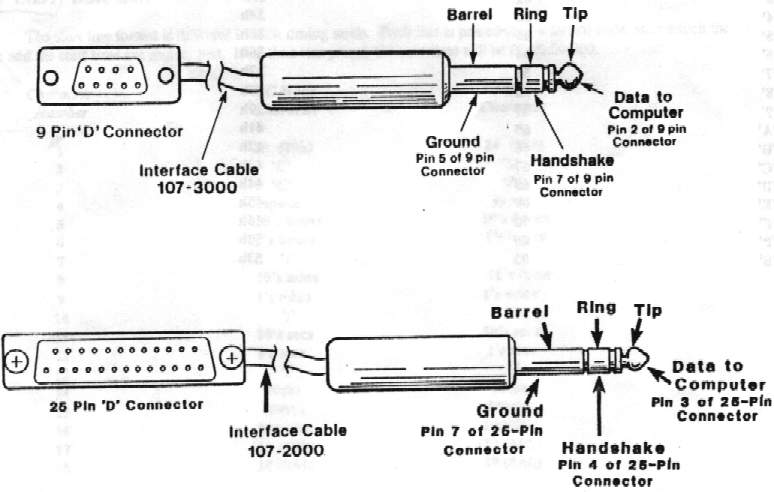
If you would like to make your own data cable, use the wiring diagram below. RS-232 serial ports are only guaranteed to work over 50 feet of cable, though they will often work over longer distances depending on the quality of the cable, the baud rate and any electric fields in the vicinity. If you wish to make the data cable longer than 50 feet, you do so at the risk of corrupted or missing data.
The CC737 does not support all the handshake lines provided by the RS-232 standard. As a result, it is necessary to wire several pins together on the serial port connector. The wiring below will trick an RS-232 port into believing all of the normal control lines are connected. Use the table diagram below to wire your own cable. Also, if you do not wish to use the handshake lines, you can leave that line disconnected.
|
RS-232 Function |
9 pin 'D' Pin # |
25 pin 'D' Pin # |
Stereo Plug |
|
Signal (RXD) |
2 |
3 |
TIP |
|
Ground |
5 |
7 |
BARREL |
|
Handshake |
7 |
4 |
RING |
You will also need to connect several pins on the 'D' connector together. If you are using a 9 pin 'D' connector, connect pins 1,4,6 and 8 together but to no other pins. If you are using a 25 pin 'D' connector, connect pins 5,6,8 and 20 together but to no other pins.